
e-WorkPermit migrant worker: Common Problems and Solutions

e-WorkPermit for employers: what you can file, and fixes for data not found, login failures and credentials held by a previous agent.
The e-WorkPermit system is an electronic system of the Department of Employment used for submitting matters related to migrant worker work permits. Employers, migrant workers themselves, or authorized companies bringing migrant workers to work can submit applications, make appointments, and track status from their workplace without having to travel to the office for every step.
The most common problems employers encounter in this system are not complex issues, but rather 5 recurring basic issues: system reports no migrant worker data found · unable to log in · duplicate applications · user account still tied to the previous agent and name spelling does not match passport. Almost all of these stem from inconsistent source data, not a system malfunction.
This article provides an overview of the system, what can be submitted, common problems with solutions, and documents to prepare before starting, to help employers and HR decide which issues they can resolve themselves and which should be forwarded to those who handle these matters regularly.
What is the e-WorkPermit System and Who Needs to Use It?
e-WorkPermit is an electronic channel of the Department of Employment for migrant worker work permit matters. Its purpose is to reduce travel, minimize paper documents, and allow self-checking of application status.
There are 3 main groups involved with this system:
- Employers / Establishments — Submit matters for their own migrant workers. This is the group that uses the system the most.
- Migrant workers — Submit matters for themselves in certain application types.
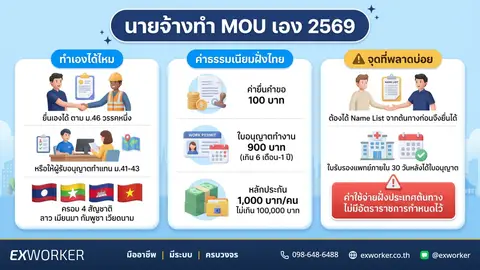
- Companies bringing migrant workers to work in the country, or authorized representatives — Submit on behalf of employers. A valid power of attorney is required.
For the grace period according to the Cabinet resolution dated July 14, 2569 (2026), the resolution clearly states that applicants can be migrant workers themselves, employers, or authorized companies bringing migrant workers to work, and submission must be made via the electronic system or at locations designated by the Department of Employment.
What Can Be Submitted via the e-WorkPermit System?
| Type of Matter | When to Use |
|---|---|
| Submit work permit application | New migrant workers eligible to apply through legally prescribed channels |
| Renew work permit | Permit nearing expiration, or within the grace period according to Cabinet resolution |
| Notify entry–notify exit / Change employer | When hiring new employees or employees leave employment |
| Edit information in application | Name, passport number, or employer information does not match |
| Schedule service appointment | Steps requiring personal appearance or document collection |
| Track application status | After submission, to know the current stage of the matter |
| Report usage problems | Encountering problems that cannot be resolved independently. The system provides a channel to submit a complaint, both for cases where login is possible and where it is not. |
System menu and screen details are updated periodically. Therefore, this article describes "what can be submitted" and "what to prepare," not a step-by-step click guide, as such guides become outdated faster than expected.
Common Problems in the e-WorkPermit System and How to Handle Them
| Symptom | Most Common Cause | What to Do First |
|---|---|---|
| System reports no data found | Document number or name does not match recorded information / Data not yet entered into the system | Verify passport number and name against the physical passport, letter by letter |
| Unable to log in | Using the wrong account type (employer/migrant worker/authorized representative) | Confirm whose account must be used for this submission |
| Duplicate applications | Resubmitted because the first attempt was thought to be unsuccessful | Always check the status of the original application before submitting a new one |
| Account still tied to the previous agent | Previously allowed the old agent to open an account and hold the credentials | Gather proof of employment and contact the Provincial Employment Office |
| Name spelling does not match | Transcribed name from passport differently each time | Always adhere to the spelling on the passport as the primary reference |
System Reports No Migrant Worker Data Found
This is the most common symptom, and almost every time it does not mean the migrant worker has been removed from the system. Common causes include entering an incorrect ID card number, passport number, or work permit number, even by a single digit. Newly submitted data is still being recorded into the system. Previous applications were incomplete and thus not recorded. Or logging in with a different account type than the one originally used for submission.
What you should do before calling anyone is to verify the document number against the physical document. Check if the first name–last name and date of birth match what was previously submitted. And if recently submitted, wait a while and check the status again. If still not found, prepare the application number, migrant worker's name, passport number, employer's name, and proof of submission before contacting an officer. This will be much faster.
For detailed information on each cause of this symptom, read more at No Data Found in e-Work Permit System: How to Fix
Unable to Log In
Before concluding that the system is down, check three things: whether the correct account type is being used (employers, migrant workers, or authorized representatives use different accounts); whether the corporate information linked to the account is still current; and whether anyone else in the company holds the same account.
If you genuinely still cannot log in, the system provides a channel to report usage problems, allowing submissions both when login is possible and when it is not. Provide complete reasons and supporting information in a single submission, as multiple incomplete submissions often slow down the process instead of speeding it up.
Duplicate Applications
Purely due to uncertainty — Submitted, but the confirmation screen did not appear, so resubmitted, resulting in two applications for the same migrant worker. The result is that the matter is rejected or remains pending review longer than usual.
The way to prevent this is to immediately record the application number and take a screenshot every time a submission is successful. Then use that number to check the status instead of resubmitting. If you find that a duplicate has been submitted, do not leave it. Inform the officer to cancel the unwanted application.
Account or Credentials Still with Previous Agent
This is the most common case we encounter when taking over work from others. Employers previously allowed the old agent to open an account and handle everything. When services were terminated, the credentials were not provided, making it impossible to check the status of their own employees.
What helps is to gather complete proof of employment — corporate registration certificate, director's ID card, employee register, proof of previous submission — then contact the Provincial Employment Office in the area to request a case-by-case solution. During this time, do not create a new overlapping account without consulting an officer first, as this will create another layer of duplicate data.
Name or Spelling Does Not Match Document
Names of Myanmar, Lao, Cambodian, and Vietnamese migrant workers can be transcribed into Thai or English in various ways. If transcribed differently each time, the system will immediately consider them as different individuals. And this will lead to the "no data found" symptom in subsequent attempts.
The safest principle is to adhere to the spelling on the passport as the sole original reference. Then use that spelling for all documents, all rounds, and all agencies. If data in the system is already incorrect, submit a request for correction before submitting any other application.
Appointment Criteria to Know Before Booking a Queue
Some procedural steps require scheduling an appointment for service. And missing an appointment does not just mean losing time for one round. It often means having to restart the entire appointment process, which directly impacts employment plans if close to the work permit expiration date.
The Department of Employment periodically updates the criteria for appointments and rescheduling notifications via the system. This is to better manage queues and reduce empty slots due to last-minute rescheduling. Before confirming an appointment every time, you should check the deadline for rescheduling notifications set by the system for that round or inquire with the Provincial Employment Office in the area. This is because these criteria can change and are not consistent across all periods.
Practical Guidelines
- Set calendar reminders for both the appointment day and the last day for rescheduling.
- Check the list of required documents at least 1–2 weeks in advance, not the night before the appointment.
- Re-check the date, time, and location of the appointment before confirming.
- Have a backup plan for who will attend or how to reschedule if the person required to appear has other commitments.
If there are mobile service units in the area, this is another option that helps reduce travel. See examples of service rounds at Mobile Work Permit of the Department of Employment
2569 (2026) Deadlines Affecting System Submissions
The system is merely a channel. What determines who must submit and when are Cabinet resolutions and subsequent announcements. As of August 2569 (2026), the points employers must watch most closely are:
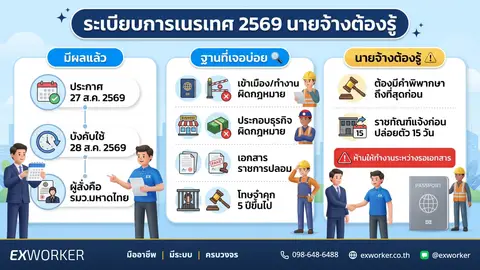
- Lao, Myanmar, and Vietnamese groups whose work permits are valid until December 11, 2569 (2026) — The Cabinet resolution dated July 14, 2569 (2026) grants an extension to stay and work until December 11, 2570 (2027). Submission of applications must be made by December 11, 2569 (2026). This date is therefore the final day for submission, not the date when rights expire.
- This group must also undergo a health check and registration as an insured person, or obtain health insurance if not covered by the social security system.
- Those who have already submitted and are awaiting visa endorsement can stay in the Kingdom until June 30, 2570 (2027). The visa will then be endorsed until December 11, 2570 (2027).
For Cambodian migrant workers in the grace period group according to the Cabinet resolution of September 24, 2567 (2024), whose work permits were valid until March 31, 2569 (2026), the renewal was postponed according to the Cabinet resolution of December 2, 2568 (2025) due to the situation at the Thai-Cambodian border. As of August 2569 (2026), no new Cabinet resolution extending the period for this group has been found. Employers with Cambodian employees should check individual status with the Provincial Employment Office in their area or hotline 1694 before taking any action.
As for the group whose work permits have already been renewed, they are a different group. And there are reports from the Department of Employment that they can stay and work until February 13, 2570 (2027). However, the expiration date appearing on each employee's work permit should be checked individually.
The above procedures and deadlines are in accordance with Cabinet resolutions. Operational details will be in accordance with announcements from the Ministry of Interior and the Ministry of Labour to be published in the Royal Gazette. Therefore, it is advisable to re-check with the Provincial Employment Office in the area before submitting any matter.
Read the detailed schedule for this round at Renew Migrant Worker Work Permits: Must Submit Before December 11, 2569 (2026) And if you are still unsure whether your employee belongs to the Cabinet resolution group or the MOU group, compare with Cabinet Resolution Migrant Workers vs. MOU: What's the Difference? first, as these two groups use different criteria and different deadlines.
What to Prepare Before Accessing the System
Most problems in the system can be resolved before even starting, if this set of information is complete and consistent across all documents.
- Original passport of the migrant worker, for verifying name spelling and passport number.
- Original work permit (for renewal cases).
- Employer documents — corporate registration certificate, authorized person's ID card.
- Power of attorney, if someone else is submitting on your behalf.
- Application number and proof of submission from the previous round.
- Proof of fee payment, health check certificate, and social security/health insurance information.
The most time-saving tip is to create a single central data file for each employee. Then have everyone in the company retrieve information from that file when filling out documents, instead of retyping from memory each time.
When to Seek Professional Help
Not every matter requires hiring someone. Many cases can be easily managed by employers themselves. However, there are 4 situations where pushing through on your own often costs more:
- Close to expiration date and matter is still pending — Insufficient time remaining for trial and error.
- Data in the system has been incorrect since the previous round — The source must be corrected first, not overwritten.
- Account is still with the previous agent and cannot be contacted — Requires negotiation with the office, with evidence.
- Dozens of employees and conflicting deadlines — In this type of work, a mistake with one person can affect the entire production line.
Exworker is a licensed company that brings migrant workers to work in the country. We regularly handle cases like these. If your matter is about timely work permit renewal, see the scope of work and conditions at Migrant Worker Work Permit Renewal Service And if it's about notifying exit–entry or taking over employees from a previous employer, see Migrant Worker Employer Change Service
We cannot guarantee that every case will conclude the same way, as the outcome depends on individual facts and the registrar's discretion. However, what we can definitely help with is knowing where to start resolving such cases and avoiding wasted time on ineffective resubmissions.
Frequently Asked Questions
The system reports no data found. Does this mean the migrant worker has fallen out of the system?
Mostly no. The primary reason is that the document number or name does not match. The secondary reason is that recently submitted data is still being recorded. You should verify the information with the original documents before concluding.
Can the employer submit it themselves, or must a representative company submit it?
For the grace period according to the Cabinet Resolution of July 14, 2569, the applicant can be the migrant worker themselves, the employer, or a company bringing migrant workers to work that has been authorized. Therefore, the employer can submit it themselves. Whether to submit it themselves or through a representative depends on the number of employees and available time.
What should I do if I have submitted it multiple times?
Do not leave it. Notify the officer to manage the duplicate requests, along with the application numbers for both items. Having overlapping pending requests often slows down the main process.
What should I do if I forgot my password or the password is with the previous representative?
Gather complete evidence of being the employer. Then contact the Provincial Employment Office in the area to request guidance on a case-by-case basis. You should not open a new overlapping account without consulting an officer.
What happens if I miss the submission deadline of December 11, 2569?
The Cabinet Resolution itself does not specifically state the consequences of missing the submission deadline. Therefore, you should not draw your own conclusions yet. What you can do is not wait until the last week, and inquire with the Provincial Employment Office in the area if you assess that you might not make it in time.
Contact Agencies
- Department of Employment Hotline 1506
- Department of Employment Hotline 1694
- Provincial Employment Office in the area where the establishment is located
References and Update Date
- Summary of Cabinet Meeting News, July 14, 2569 — Extension of work permits for Lao, Myanmar, and Vietnamese migrant workers according to Cabinet Resolution of November 11, 2568
- Summary of Cabinet Meeting News, March 10, 2569 — Measures to resolve obstacles in submitting work permit applications
- Cabinet Resolutions of September 24, 2567, and December 2, 2568 — Cambodian nationality grace period group
- Operational experience of the Exworker team as a company bringing migrant workers to work in the country
Content Updated: August 20, 2569 — This content refers to Cabinet Resolutions and guidelines effective as of the said date. The Department of Employment's criteria may change. You should check with the Provincial Employment Office in the area before proceeding.
Comments
2 commentsยื่น e-WorkPermit แล้วระบบขึ้นว่ารอชำระเงิน ต้องจ่ายภายในกี่วันครับ ถ้าเลยกำหนดต้องยื่นใหม่ทั้งหมดไหม
สวัสดีค่ะ 😊 ระบบ e-WorkPermit จะแสดงวันครบกำหนดชำระไว้ในหน้าคำขอและในใบแจ้งชำระเงินที่พิมพ์ออกมาค่ะ ให้ยึดวันที่บนใบแจ้งนั้นเป็นหลัก เพราะแต่ละคำขอ/แต่ละรอบไม่เท่ากัน - ถ้ายังไม่เลยกำหนด: ชำระตามช่องทางที่ระบุบนใบแจ้ง แล้วสถานะคำขอจะเดินต่อเอง - ถ้าเลยกำหนดแล้ว: คำขอมักถูกยกเลิก ต้องยื่นคำขอใหม่และรับนัดใหม่ ไม่สามารถจ่ายย้อนหลังด้วยใบแจ้งเดิม - ตรวจสถานะได้จากหน้าคำขอในระบบ หรือโทรสายด่วนกรมการจัดหางาน 1506 พร้อมเลขที่คำขอ ถ้าไม่แน่ใจว่าคำขอยังใช้ได้อยู่ไหม ส่งเลขที่คำขอมาทาง LINE @exworker ทีมงานช่วยเช็กสถานะให้ได้ค่ะ
Leave a comment
Signed-in comments appear immediately — no review wait.
Every comment is reviewed before it appears.